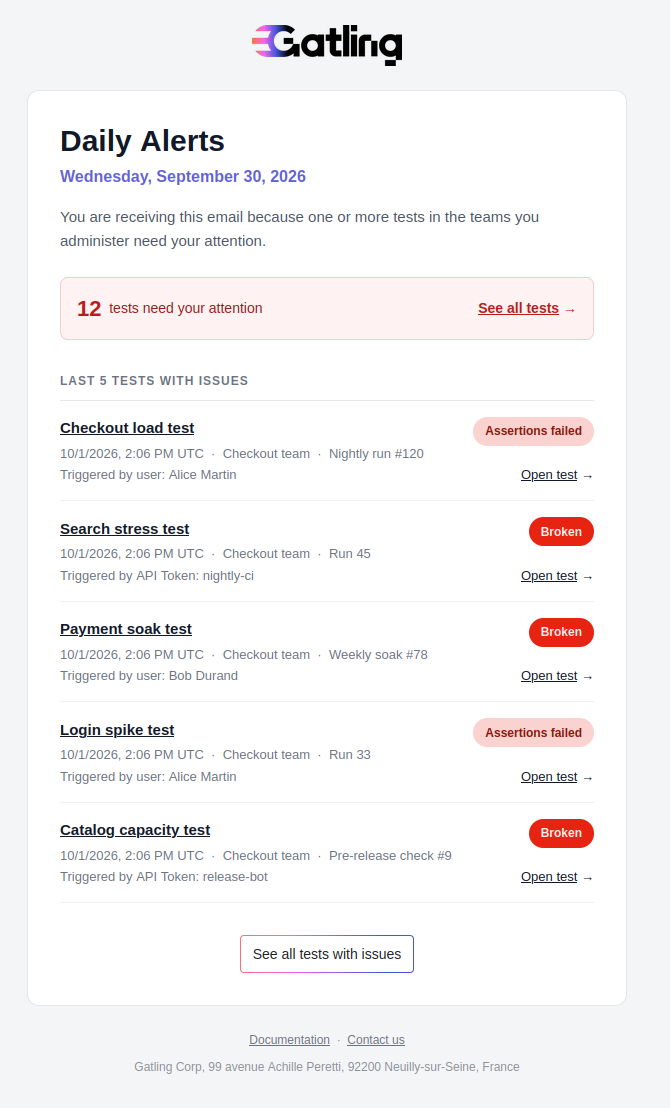
Daily Alerts email
Find out each day which tests in your teams ended without success the day before, without opening Gatling.
Understand how Daily Alerts works
Daily Alerts is an email that Gatling Enterprise Edition sends automatically to team administrators. It lists the tests in their teams that need attention: tests whose last run ended the previous day without success.
If no test needs attention, Gatling doesn’t send an email.
Check who receives Daily Alerts
You receive Daily Alerts if you have the Administrator role on at least one team. Organization administrators who don’t administer a team don’t receive Daily Alerts. The email lists the tests of the teams you administer. To learn more about roles, see Manage users and permissions.
Check when Gatling sends Daily Alerts
Gatling sends Daily Alerts every day. Each email covers the previous day, from 00:00 to 24:00 UTC.
The email lists a test only if its last run ended the previous day without success. If a test failed that day but its last run is successful when Gatling sends the email, the test isn’t listed.
See an example email
The email shows the total number of tests that need your attention in the teams you administer, and lists up to five of the most recent tests with issues. Select Open test to go to the run, or See all tests with issues to open the Tests page filtered on the Unsuccessful status.