

Load test a Kafka server
Produce records on a Kafka cluster with the Gatling Kafka plugin, and run a capacity test locally and on Gatling Enterprise Edition.
Test your Kafka server with Gatling
This guide shows how to load test a Kafka cluster with the Gatling Kafka plugin, from a first local run to a capacity test on Gatling Enterprise Edition. The examples are available in Java, JavaScript, Kotlin, and Scala. See the Kafka reference documentation for every option, and the demo project for a ready-to-run project in each language and build tool.
Meet the prerequisites
To follow this guide, you need:
- Gatling version 3.16 or higher
- Java 11 or higher, for Java, Kotlin, and Scala
- A Gatling project, such as the Maven, Gradle, or JavaScript demo project
- A Kafka broker, up and running, or Docker to start one locally
- A Gatling Enterprise Edition account and an API token with the
Configurerole, to run the test at scale
Add the dependency
Add the Gatling Kafka dependency to your Gatling project, in addition to the usual Gatling dependencies. The plugin brings the Apache Kafka client, so you don’t need to add a separate repository or the Kafka client yourself.
For Java or Kotlin with Maven, add this dependency to your pom.xml file:
<dependency>
  <groupId>io.gatling</groupId>
  <artifactId>gatling-kafka-java</artifactId>
  <version>3.16.1.2</version>
  <scope>test</scope>
</dependency>
For Java or Kotlin with Gradle, add this dependency to your build.gradle file:
dependencies {
  gatlingImplementation("io.gatling:gatling-kafka-java:3.16.1.2")
}
For JavaScript or TypeScript, install the package:
npm install @gatling.io/kafka@3.16.102
For Scala, use the io.gatling:gatling-kafka artifact instead, as the project setup describes for Maven, Gradle, and sbt.
If you use Avro, Protobuf, or JSON Schema with a schema registry, or Amazon MSK IAM authentication, also add the optional library the feature needs.
Write the simulation
Create a simulation with the following content.
In Java, Kotlin, and Scala, save it as a KafkaSimulation class in a kafka package, and rename the class to match.
In JavaScript and TypeScript, save it as src/kafka.gatling.ts.
The commands in this guide use these names.
import io.gatling.javaapi.core.*;
import io.gatling.javaapi.kafka.KafkaProtocolBuilder;

import static io.gatling.javaapi.core.CoreDsl.*;
import static io.gatling.javaapi.kafka.KafkaDsl.*;

public class KafkaSampleJava extends Simulation {

  public static final String BOOTSTRAP_SERVERS =
    System.getProperty("BOOTSTRAP_SERVERS", "localhost:9092");
  // "local" stays within the Community Edition limits, "capacity" runs on Gatling Enterprise Edition
  public static final String PROFILE = System.getProperty("PROFILE", "local");

  private final KafkaProtocolBuilder kafkaProtocol = kafka
    .bootstrapServers(BOOTSTRAP_SERVERS);

  private final ScenarioBuilder kafkaProducer = scenario("Kafka Producer")
    .exec(
      kafka("Place order")
        .send("orders")
        .value(StringBody(
          "{\"amount\": #{randomInt(1,1000)}, \"createdAt\": #{currentTimeMillis()}}"))
        // a different key for each record spreads the records over the partitions
        .key("#{randomUuid()}")
        .header("source", "gatling")
    );

  private final PopulationBuilder population = PROFILE.equals("capacity")
    ? kafkaProducer.injectOpen(
        // raise the levels until the response time or the error rate changes
        incrementUsersPerSec(1000)
          .times(4)
          .eachLevelLasting(60)
          .separatedByRampsLasting(10)
          .startingFrom(100.0))
    : kafkaProducer.injectOpen(atOnceUsers(5));

  {
    setUp(population)
      .protocols(kafkaProtocol)
      // fail the run when more than 1% of the records fail
      .assertions(global().failedRequests().percent().lt(1.0));
  }
}
import {
StringBody,
atOnceUsers,
getParameter,
global,
incrementUsersPerSec,
scenario,
simulation
} from "@gatling.io/core";
import { kafka } from "@gatling.io/kafka";
export default simulation((setUp) => {
const bootstrapServers = getParameter("BOOTSTRAP_SERVERS", "localhost:9092");
// "local" stays within the Community Edition limits, "capacity" runs on Gatling Enterprise Edition
const profile = getParameter("PROFILE", "local");
const kafkaProtocol = kafka
.bootstrapServers(bootstrapServers);
const kafkaProducer = scenario("Kafka Producer")
.exec(
kafka("Place order")
.send("orders")
.value(StringBody(
'{"amount": #{randomInt(1,1000)}, "createdAt": #{currentTimeMillis()}}'))
// a different key for each record spreads the records over the partitions
.key("#{randomUuid()}")
.header("source", "gatling")
);
const population = profile === "capacity"
? kafkaProducer.injectOpen(
// raise the levels until the response time or the error rate changes
incrementUsersPerSec(1000)
.times(4)
.eachLevelLasting(60)
.separatedByRampsLasting(10)
.startingFrom(100))
: kafkaProducer.injectOpen(atOnceUsers(5));
setUp(population)
.protocols(kafkaProtocol)
// fail the run when more than 1% of the records fail
.assertions(global().failedRequests().percent().lt(1.0));
});import io.gatling.javaapi.core.*
import io.gatling.javaapi.core.CoreDsl.*
import io.gatling.javaapi.kafka.KafkaDsl.*
class KafkaSampleKotlin : Simulation() {
val bootstrapServers = System.getProperty("BOOTSTRAP_SERVERS", "localhost:9092")
// "local" stays within the Community Edition limits, "capacity" runs on Gatling Enterprise Edition
val profile = System.getProperty("PROFILE", "local")
val kafkaProtocol = kafka
.bootstrapServers(bootstrapServers)
val kafkaProducer = scenario("Kafka Producer")
.exec(
kafka("Place order")
.send("orders")
.value(StringBody(
"""{"amount": #{randomInt(1,1000)}, "createdAt": #{currentTimeMillis()}}"""))
// a different key for each record spreads the records over the partitions
.key("#{randomUuid()}")
.header("source", "gatling")
)
val population =
if (profile == "capacity")
kafkaProducer.injectOpen(
// raise the levels until the response time or the error rate changes
incrementUsersPerSec(1000.0)
.times(4)
.eachLevelLasting(60)
.separatedByRampsLasting(10)
.startingFrom(100.0))
else
kafkaProducer.injectOpen(atOnceUsers(5))
init {
setUp(population)
.protocols(kafkaProtocol)
// fail the run when more than 1% of the records fail
.assertions(global().failedRequests().percent().lt(1.0))
}
}import scala.concurrent.duration._
import io.gatling.core.Predef._
import io.gatling.kafka.Predef._
class KafkaSampleScala extends Simulation {
val bootstrapServers = System.getProperty("BOOTSTRAP_SERVERS", "localhost:9092")
// "local" stays within the Community Edition limits, "capacity" runs on Gatling Enterprise Edition
val profile = System.getProperty("PROFILE", "local")
val kafkaProtocol = kafka
.bootstrapServers(bootstrapServers)
val kafkaProducer = scenario("Kafka Producer")
.exec(
kafka("Place order")
.send("orders")
.value(StringBody(
"""{"amount": #{randomInt(1,1000)}, "createdAt": #{currentTimeMillis()}}"""))
// a different key for each record spreads the records over the partitions
.key("#{randomUuid()}")
.header("source", "gatling")
)
val population =
if (profile == "capacity")
kafkaProducer.inject(
// raise the levels until the response time or the error rate changes
incrementUsersPerSec(1000)
.times(4)
.eachLevelLasting(60.seconds)
.separatedByRampsLasting(10.seconds)
.startingFrom(100))
else
kafkaProducer.inject(atOnceUsers(5))
setUp(population)
.protocols(kafkaProtocol)
// fail the run when more than 1% of the records fail
.assertions(global.failedRequests.percent.lt(1.0))
}The following sections explain each part of the simulation.
Configure the protocol
The protocol defines at least the brokers to bootstrap from. The topic isn’t part of the protocol: each action sets the topic it produces to.
The simulation reads the brokers from the BOOTSTRAP_SERVERS system property, a parameter in JavaScript and TypeScript, so that you can point the same simulation at a local broker and at your real cluster.
To set other Kafka client properties, see set Kafka client properties.
Secure the connection
If your Kafka cluster requires authentication, configure it with the typed security options rather than raw sasl.* properties.
Read the credentials the same way as the brokers, and prefix the names of secrets with sensitive., so that Gatling Enterprise Edition doesn’t display them in the run’s details.
For example, replace the protocol with this one for SASL PLAIN over TLS and a schema registry:
public static final String KAFKA_USER = System.getProperty("KAFKA_USER", "");
public static final String KAFKA_PASSWORD = System.getProperty("sensitive.KAFKA_PASSWORD", "");
public static final String REGISTRY_URL = System.getProperty("REGISTRY_URL", "");
public static final String REGISTRY_USER = System.getProperty("REGISTRY_USER", "");
public static final String REGISTRY_PASSWORD = System.getProperty("sensitive.REGISTRY_PASSWORD", "");

private final KafkaProtocolBuilder kafkaProtocol = kafka
  .bootstrapServers(BOOTSTRAP_SERVERS)
  // security.protocol is SASL_SSL
  .saslPlain(KAFKA_USER, KAFKA_PASSWORD)
  .useTls()
  .schemaRegistry(REGISTRY_URL)
  .schemaRegistryBasicAuth(REGISTRY_USER, REGISTRY_PASSWORD);
const kafkaUser = getParameter("KAFKA_USER", "");
const kafkaPassword = getParameter("sensitive.KAFKA_PASSWORD", "");
const registryUrl = getParameter("REGISTRY_URL", "");
const registryUser = getParameter("REGISTRY_USER", "");
const registryPassword = getParameter("sensitive.REGISTRY_PASSWORD", "");
const kafkaProtocol = kafka
.bootstrapServers(bootstrapServers)
// security.protocol is SASL_SSL
.saslPlain(kafkaUser, kafkaPassword)
.useTls()
.schemaRegistry(registryUrl)
.schemaRegistryBasicAuth(registryUser, registryPassword);val kafkaUser = System.getProperty("KAFKA_USER", "")
val kafkaPassword = System.getProperty("sensitive.KAFKA_PASSWORD", "")
val registryUrl = System.getProperty("REGISTRY_URL", "")
val registryUser = System.getProperty("REGISTRY_USER", "")
val registryPassword = System.getProperty("sensitive.REGISTRY_PASSWORD", "")
val kafkaProtocol = kafka
.bootstrapServers(bootstrapServers)
// security.protocol is SASL_SSL
.saslPlain(kafkaUser, kafkaPassword)
.useTls()
.schemaRegistry(registryUrl)
.schemaRegistryBasicAuth(registryUser, registryPassword)val kafkaUser = System.getProperty("KAFKA_USER", "")
val kafkaPassword = System.getProperty("sensitive.KAFKA_PASSWORD", "")
val registryUrl = System.getProperty("REGISTRY_URL", "")
val registryUser = System.getProperty("REGISTRY_USER", "")
val registryPassword = System.getProperty("sensitive.REGISTRY_PASSWORD", "")
val kafkaProtocol = kafka
.bootstrapServers(bootstrapServers)
// security.protocol is SASL_SSL
.saslPlain(kafkaUser, kafkaPassword)
.useTls
.schemaRegistry(registryUrl)
.schemaRegistryBasicAuth(registryUser, registryPassword)For the other authentication mechanisms, see secure the connections.
Produce records
The scenario produces an order record with a key and a header on the orders topic.
It uses Gatling Expression Language functions so that each record differs:
- The key is a random UUID. The producer picks a record’s partition from its key, so a different key for each record spreads the load over all the partitions of the topic, as most production traffic does. A constant key sends every record to the same partition, which measures a single partition instead of the cluster.
- The value is a JSON order, with a random amount and a timestamp.
The value accepts any Gatling body, such as StringBody, ElFileBody, or RawFileBody.
To send records built from your own data, such as real order ids, use a feeder.
The response time of send lasts until the broker acknowledges the record, as the producer’s acks property defines.
Choose the injection profile
If your cluster isn’t in production yet and you’re early in development, run a capacity test. This type of test shows the overall behavior of your application as the load increases.
The capacity test starts far more than the 5 virtual users that Gatling Community Edition allows locally, so the simulation defines two profiles, picked with the PROFILE property:
local, the default, starts 5 virtual users, to debug the simulation on your machine.capacityruns the capacity test, on Gatling Enterprise Edition.
The capacity levels go from 100 to about 3,100 records per second, which a production Kafka cluster typically handles without strain.
Raise them until the response time or the error rate changes: that’s your cluster’s capacity.
The assertion fails the run when more than 1% of the records fail. Without assertions, Gatling Enterprise Edition marks a run as successful even when every record fails, and so does your CI pipeline. See assertions for other criteria, such as response time percentiles.
linger.ms drives the response time of send: configure batching like the system under test.Execute the test
Run your test locally first to debug it, then run the capacity test on Gatling Enterprise Edition.
Run the test locally
Run the simulation with its default local profile.
With Maven:
mvn gatling:test -Dgatling.simulationClass=kafka.KafkaSimulation
With Gradle:
./gradlew gatlingRun --simulation kafka.KafkaSimulation
With sbt:
sbt 'Gatling/testOnly kafka.KafkaSimulation'
With JavaScript or TypeScript:
npx gatling run --simulation kafka
To use another broker than localhost:9092, pass the system property on the command line, for example -DBOOTSTRAP_SERVERS=broker1:9092.
With npx gatling run, add BOOTSTRAP_SERVERS=broker1:9092 after the command’s options instead.
When the test passes, the Place order request shows 5 OK records, the assertion passes, and the records appear on the topic.
If they don’t, see troubleshoot common errors.
Run the test on Gatling Enterprise Edition
Gatling Enterprise Edition runs the test without the local limits. Follow these steps:
-
Set your API token in the
GATLING_ENTERPRISE_API_TOKENenvironment variable. -
Create a
.gatling/package.conffile at the root of your project, with the team, the location, and the system properties that your simulation reads, includingPROFILE = "capacity". In JavaScript and TypeScript, the simulation is the file name without.gatling.ts, herekafka. See Configuration as Code for every option.gatling.enterprise.package { name = "Kafka load test" team = "Default team" simulations = [ { name = "Kafka capacity test" simulation = "kafka.KafkaSimulation" locations = [ { name: "Europe - Paris", size: 1 } ] parameters { systemProperties { "BOOTSTRAP_SERVERS" = "broker1.example.com:9092" "PROFILE" = "capacity" } } } ] }Keep secrets, such as
sensitive.KAFKA_PASSWORD, out of this file and out of source control: set them in the test’s load generator parameters in Gatling Enterprise Edition after the first deployment instead. -
Deploy and start the simulation, waiting for the end of the run. With Maven:
mvn gatling:enterpriseStart -Dgatling.enterprise.waitForRunEnd=trueWith Gradle:
./gradlew gatlingEnterpriseStart -Dgatling.enterprise.waitForRunEnd=trueWith JavaScript or TypeScript:
npx gatling enterprise-start --wait-for-run-endThe command fails when an assertion fails. With sbt, see the sbt plugin documentation.
Without BOOTSTRAP_SERVERS, the simulation falls back to localhost:9092, which the load generators can’t reach, and every record fails.
Without PROFILE, it runs the local profile with 5 virtual users.
The package doesn’t need to include the Kafka plugin: the Gatling build plugins leave it out, and Gatling Enterprise Edition provides it when the test runs. The optional libraries, such as Confluent’s serializers, are packaged with your simulation. See the Maven, Gradle, and JavaScript documentation for the other deployment options.
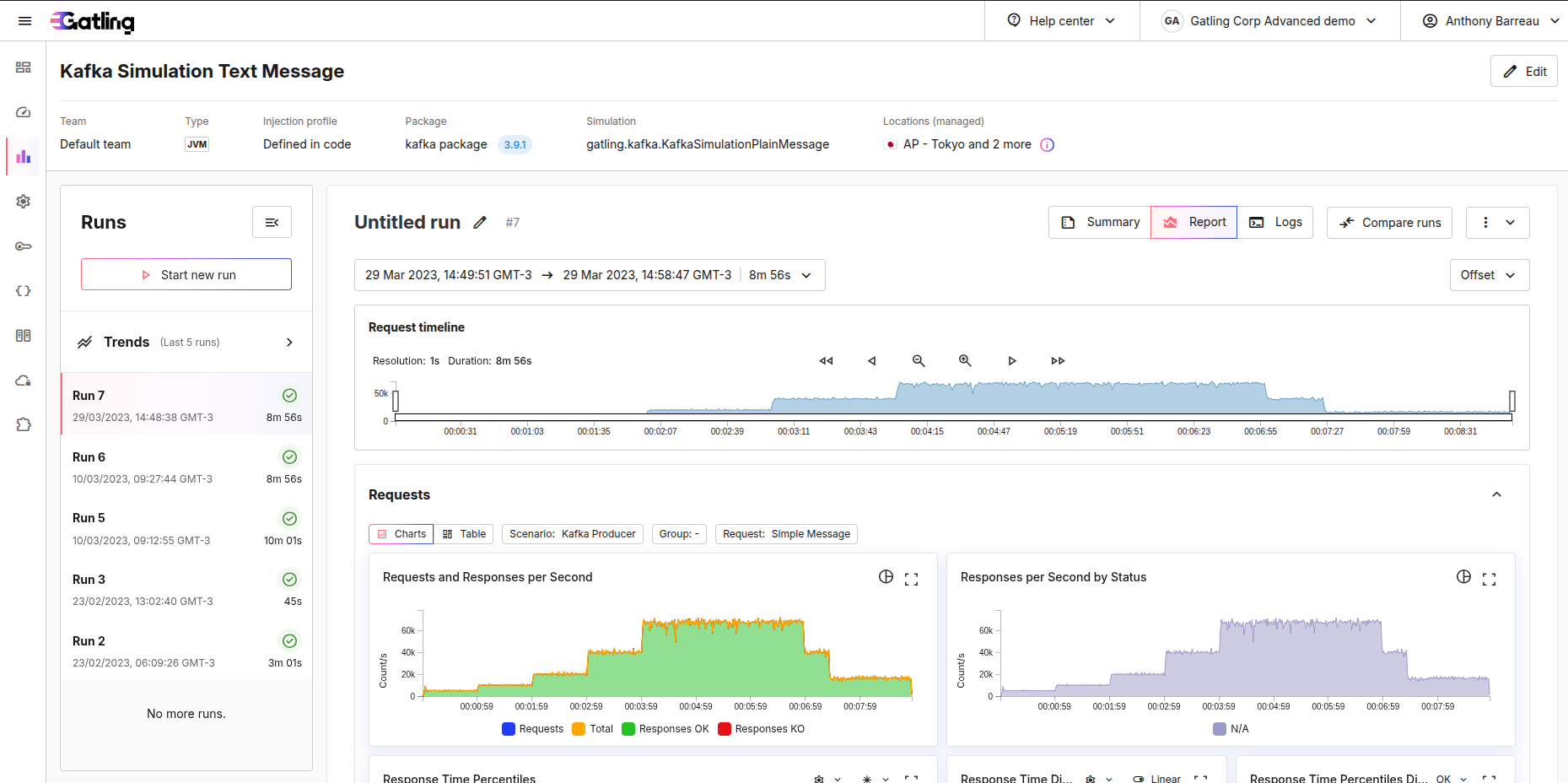
The run’s report shows the records sent per second at each level of the capacity profile:
The load generators must reach your Kafka brokers, and the schema registry if you use one. If your Kafka broker can’t be accessed from the Internet, you have two options:
- Private Locations: if your target environment is private (closed to the Internet).
- Dedicated IP Addresses: if your target environment is public (open to the Internet) but protected by a firewall.
Both features let you run your tests in multiple environment configurations. Contact our team for more information.
Troubleshoot common errors
The following errors are the most common when you start testing Kafka with Gatling:
| Error | Cause and fix |
|---|---|
GATLING KAFKA TRIAL VERSION: shutting down the test, exceeded the limit of 5 virtual users |
The local run started a 6th virtual user, for example with PROFILE=capacity. Run the local profile locally, and the capacity test on Gatling Enterprise Edition. |
Failed to send: o.a.k.c.e.TimeoutException: Topic orders not present in metadata after 60000 ms. |
The producer can’t reach the brokers, can’t authenticate, or the topic doesn’t exist and the cluster doesn’t create topics automatically. Check BOOTSTRAP_SERVERS, the security options, and that the topic exists. |
| Each failed request takes 60 seconds | The producer waits up to max.block.ms, 60 seconds by default, for the topic’s metadata, and the records of a topic are sent one after the other. While you debug, set .producerProperty("max.block.ms", "5000") to fail faster. |
Kafka producer saturated |
The brokers or the producer can’t keep up with the load. See how records are sent. |
Install a Kafka cluster with Docker
If you can’t access a Kafka cluster, start a single-node cluster with Docker, using the official Apache Kafka image.
Create a docker-compose.yml file with this content:
services:
  kafka:
    container_name: kafka
    image: apache/kafka:4.4.0
    ports:
      - 9092:9092
Start the Kafka cluster:
docker compose up -d
Create the orders topic with 3 partitions, so that the records spread over several partitions:
docker exec -it kafka /opt/kafka/bin/kafka-topics.sh --create --bootstrap-server localhost:9092 --replication-factor 1 --partitions 3 --topic orders
View the records sent to the topic, with their partition and key:
docker exec -it kafka /opt/kafka/bin/kafka-console-consumer.sh --bootstrap-server localhost:9092 --from-beginning --topic orders --formatter-property print.partition=true --formatter-property print.key=true
Next steps
You can now load test a Kafka cluster with Gatling and develop a scenario that meets your testing needs. Use the Kafka actions to measure request-reply and end-to-end latencies, check the records your system produces, and send Avro, Protobuf, or JSON Schema records with a schema registry. Use one of our CI/CD plugins to get quick feedback on your broker’s performance during development.