

Teams administration
Administer your organization's teams in Gatling Enterprise Edition.
Managing teams
To access the Teams page, click on the “Teams” tab in the Organization page.
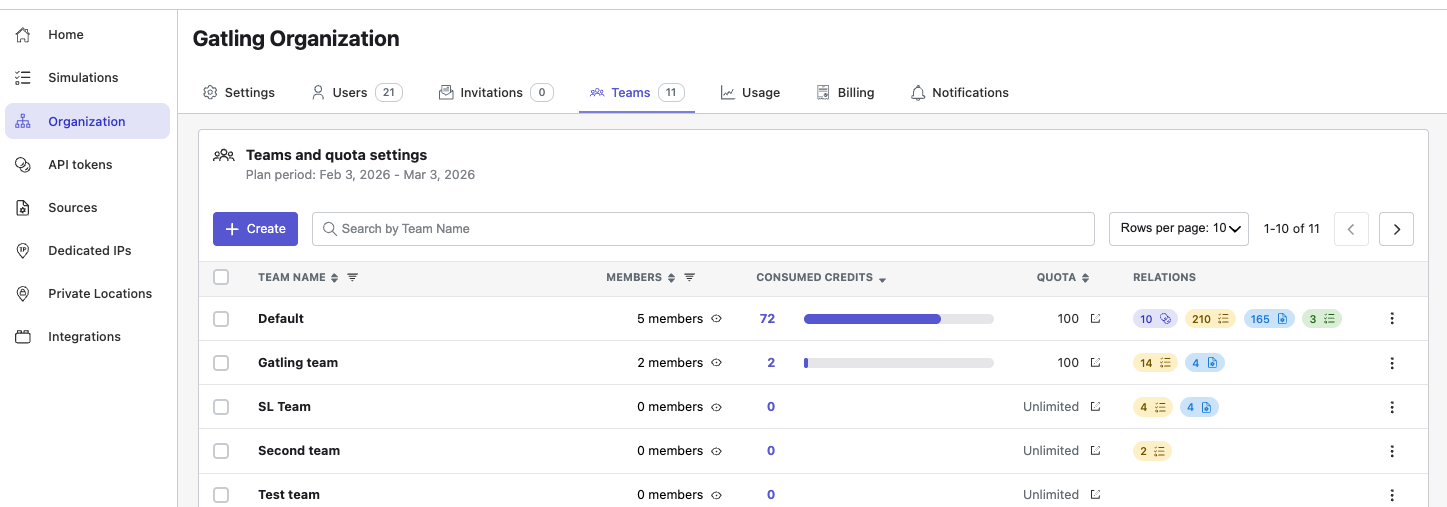
Displayed data are limited to the teams you belong to.
Creating, editing, or deleting teams requires administrator access. See Teams administration for details.
In the teams table, you can see for each team:
- team name,
- number of members (click the link to see the member list),
- number of credits consumed for the current period,
- credit quota limit and its edition (Administrator only),
- associated API tokens, tests, packages, and repositories (click the pills to see linked elements).
Using the menu at the end of each row, you can:
- copy the team ID,
- edit the team name (Administrator only),
- delete a team (Administrator only).
Team creation
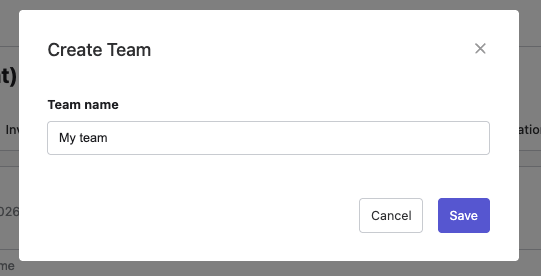
To create a new team, click on the Create button and enter a name for the new team.
Change quota settings
You must have an annual plan and be an Organization Administrator to change quota setting.
Team quota
You must be an Organization Administrator to set team quotas.
Usage quotas allow you to control credit consumption on a team by team basis. Set quotas are automatically carried over to your next billing period. To set a team usage quota:
- Click the icon located in the Quota column of the table.
- Enter a value less than your total billing period allotment.
- Click Save.
You can edit the team quotas for the selected period (annual or monthly). Leave the input empty to set an unlimited credit consumption to a team.
Billing, plans, and offers are managed by administrators. See Billing for details.